Posts

I just wanted to jot down a quick note about this app because its about to transform the way I analyze my golf swing. Until now, I was using V1 Golf, an awesome app for iOS, and I’ve also been using SwingReader. Both are great for being able to add plane lines, check angles and control slow motion video of your swing …. at 30 FPS.

30 is great and all I needed, until I found SloPro. With the iPhone 4S, it captures true 60 FPS video and the playback is like butter. With this app, I’m able to see things about my swing that I haven’t seen before. Doubling the frame count really does matter! And if I want to, I can crank up the Slo Mo, to 500FPS or even 1000 FPS, which a few optical tricks of course. But even at 60 FPS, I’ll be able to look at my swing, especially key areas such as transition, with a new lens. Unfortunately, the hardware on the iPad just isnt there yet to truly harness this app, but it still works just with a little more trickery.

You can check it out here: SloPro – 60fps Slow Motion Video

For the first time, mobile users opened up native apps more than we used our mobile browsers. 44.9% of us used mobile apps compared to 44.4% of mobile subscribers that used the browser (I use both), according to data from comScore’s November mobile subscriber report.

I’m not really surprised by this report, in fact I’m a bit surprised it is still this close. For one thing, the two most popular mobile platforms are Android and iOS (75.6% of all smartphones) which are both app-friendly. And if we think through our own mobile habits, I bet the majority of us spend a lot more time in apps than in the browser. We all likely use at least one of the major social apps such as Facebook, Twitter, Path and LinkedIn, at least daily. How about Weather Channel to view the forecast, ESPN Scorecenter for sports, Instagram for photo sharing, Meebo for messaging, WordPress to write this post. I can already see that I likely use apps more than the browser.

But if I want to find information about something that does not fit neatly into one of the apps I have installed, I use the browser because its fast, reliable and easy. And I’m not alone. Google has seen a 400% increase in mobile searches this past year from fully featured mobile browsers.

That means if I’m interested in learning more about a company, the first place I’m looking isn’t in the app store where I have to search, find, install, enter my apple ID password and wait for it to download. The first place I’m going is google or directly to the company website.

Mobile Career Sites are the foundation

Its critical that companies today start thinking mobile first. But they need to be thinking about the right piece of mobile to put first. At Bernard Hodes Group, we believe the foundation of a mobile recruitment strategy starts with an optimized mobile career site. Having an optimized mobile career site allows your organization to tap into the widest set of mobile users regardless if they are iPhone/Android/Blackberry/Other users, granting them instantaneous access to your career information such as company info, events nearby, and “jobs near me.”

Here’s a quick example of creating a location-centric, app-like mobile site experience: Let’s say I’m in your retail store or walking down the street passing your building or standing in your office looking at an LCD screen promoting career opportunities at your company. I’m likely not going to spend 3 minutes or so to hit up the app store, go thru that process, then open the app, hit the GPS button to find my location, and then see job opportunities around me. But I might take 10 seconds to scan a QR code or type your site URL – or in the coming years leverage image recognition or even NFC – which will take me directly to your optimized mobile career site to pre-generated search results showing job opportunities for that specific location. In a few seconds and only a few clicks, I now have access to the targeted information I want and I didn’t have to download an app to get it. That is one simple example, but it shows just how powerful mobile sites can be at quickly delivering information.

Lots of new Smartphones, rich browsers

Smartphone growth is accelerating with smartphones accounting for 59% of all new phones sold. Over 6.5M were activated on just on Dec 25th this year. These devices have powerful operating systems and rich browsing capabilities. HTML5, while not perfect yet, allows us to create app like experiences for these devices by leveraging GPS to show “jobs near me”, advanced search, multimedia, cool gesture-based actions or transitions and more. And it will continue evolving over time.

In future posts, I’ll dig into the features and functionality of optimized mobile sites and also explore some ways that mobile apps CAN play a successful role in your mobile recruitment strategy. Apps definitely have a place in your mobile recruitment marketing strategy, but if you are just getting started and want to position yourself now and for the future, think mobile sites first.
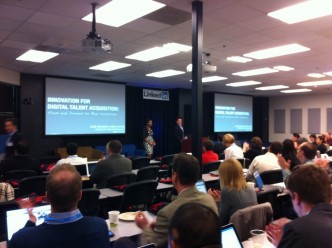
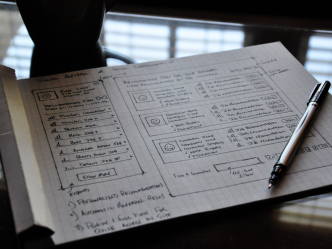
Lab Dreams to Real Solutions @ LinkedIn HQ

I was honored and excited to be asked to lead a session at the May 2011 Recruiting Innovation Summit at LinkedIn HQ.  ERE (and specifically @TheLance) put on a great summit and all the presentations brought exciting and thought-provoking ideas the attendees.

I enjoyed putting this presentation together and had a blast presenting with Tomya Ryans, who shared some dynamite thoughts and answers during Q&A.  If you couldn’t attend or just want to review, here is an overview of the session Innovation for Digital Talent Acquisition: From Lab Dreams to Real Solutions.

The theme is taking ideas from the lab into real, live solutions.  Instead of only talking about high level concepts, we actually walk thru what we can create and the “why” behind what we wanted to do.  Four distinct areas are covered:

  • Personalized Candidate Experience
  • Facebook Innovation
  • Mobile Innovation
  • Live Twitter FAQ
Personalized Candidate Experience

There are three things we know: 1) A massive number of people have LinkedIn and Facebook profiles. 2) Internet users are becoming more comfortable with the idea of “logging in with your social profile.” And 3) the data in those profiles contains a goldmine of information we can use to create personalized experiences on career sites that are tailored to each visitor’s individual work experience, education, skills, location and more.

Let’s leverage that information intelligently and start offering visitor’s job recommendations, talent areas, content and more, based on their OWN profiles and not simply generic hot jobs or opportunities. You can see this concept in action by going to http://tmobile.jobs and clicking on “Job Recommendations for You.

Facebook Innovation

We talked about two concepts in this section: Personalized Custom Sections and playing in the stream on Facebook. We’ve all seen beautiful custom sections and we’ve seen not-so-beautiful custom sections on company Facebook Pages. What we haven’t seen much of are sections that leverage social profile data. Custom sections can allow user authentication in the exact same way as Facebook Applications. Instead of simply presenting the same info to all users, allow them to authenticate the section and then personalize the experience by leveraging their location, work history or any other piece of their profile.

Shameless plug: The Innovation team @ Hodes created The Instream Jobs Facebook App to demonstrate how companies can “play in the stream” more intelligently and we demo’d it live. The app transforms traditional wall posts about job opportunities by posting a dynamic, branded application with full job details that keeps the user on Facebook instead of forcing them to leave. Instead of basic text and a link, this app allows the branding, company info and job details to show up in the newsfeed of people who Like your company. It doesn’t have to be just be jobs (and it doesn’t have to be our app), you can play in the stream in a number of cool and interesting ways.

Mobile Innovation

I’m going to sum up the mobile innovation section quickly … now is the time to mobilize your recruitment strategy. If you need some supporting stats, check out the first slide in this section, it should be all you need. Since we know our mobile phones are personal and what we do with them is social, let’s start personalizing the mobile experience by leveraging social data. Mobile is about utility and this concept packs a ton of utility.

This section also covered integrating Twitter and Foursquare to build interesting mobile event pages, and creating unique search experiences by leveraging Augmented Reality. There is so much to be done, so much to talk about when it comes to mobile recruiting, that we could spend days talking about it.

Live Twitter FAQ

The last section was more of an experiment than anything else as we discussed using Twitter to replace live FAQ pages on career sites. To demonstrate the concept, we asked everyone to use various hashtags thru out the presentation when they asked questions. During the Q&A, we pulled up a live demo of what Twitter FAQ pages might look like packed with actual audience questions and answers. Showing job seekers information asked and answered by the community of job seekers and company brand ambassadors – instead of static, old info – has the potential to really showcase (in a good way) what life is like inside your organization and attract the calibre of candidates you’re looking for.

Slides and Video

Below is the deck and video from the presentation. The video includes live demonstrations of all the products/concepts in the presentation. If you have any questions or just want to talk more about any of the concepts presented, I’d love to hear from you.

Portfolio Items